Mobile scanner for fast, clean PDF capture on Android devices
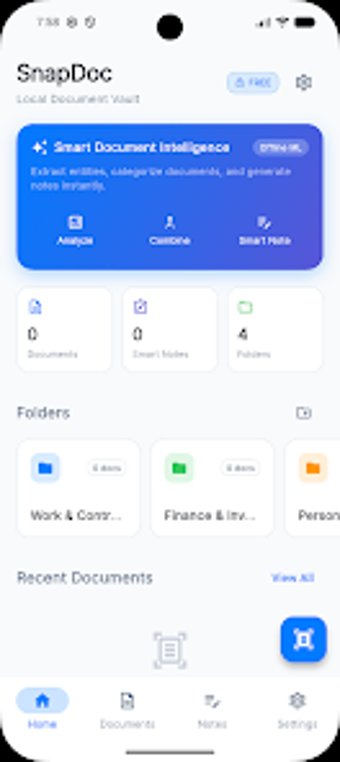
Converts phone camera shots into high-resolution PDFs or JPEGs with automatic edge correction and multi-page batching, built around quick capture and file organisation. Developed by Apps 2 Use for the business-productivity category, it includes OCR powered by Google ML Kit, image enhancement filters, and cloud sync with major providers. The app targets students digitizing notes, professionals managing invoices and contracts, and home users organising personal paperwork.
What the app does day to day for document workflows
Snapdoc captures single pages or dozens at once and compiles them into ordered PDF or JPEG exports, using automatic edge detection and perspective correction to produce readable output. It also offers multiple image filters such as Magic Color and Grayscale to improve legibility before export. These steps map to a simple capture-to-export pipeline for routine tasks like receipt tracking, contract archiving, and study-note digitisation.
How core scanning and file management shape professional output
The app groups scans into a library with colour-coded folders, instant search, and options to rename or reorder pages, which supports basic document lifecycle work. Batch scanning assembles multi-page documents in a single file, while OCR extracts text for search and copy operations. Those elements let a user produce shareable documents and searchable archives without switching between separate camera and editor apps.
How it fits into team workflows and performance expectations
Snapdoc syncs with Google Drive, Microsoft OneDrive, and Dropbox for off-device backup and sharing, so files move into existing workflows. The developer designed the app to run lightly on Android hardware, avoiding intrusive ads and aiming for fast scanning sessions. Stability in routine use is supported by local processing and straightforward export to common formats used in business and education.
Who should use Snapdoc and where it stops being ideal
Snapdoc suits individuals and small teams who do most document capture on Android devices and want quick, mobile-first scanning without extra branding. Its privacy-first, on-device processing and lack of watermarks make it appropriate for handling sensitive paperwork. For businesses that require integrated desktop capture or cross-platform native clients, the Android-focused design may present a workflow limitation.